
Tasks and little celebrations
Add a task beside your dog and manage your list. Check off completed work and your companion celebrates with you.
A small companion for your working day.
Windows & Mac desktop app


AI subscription usage is included in both free and paid editions. The same full features are included with a regular purchase and every Wadiz reward. Your free dog’s name and friendship carry over when you activate a key in the same app.
Connect supported tools such as Claude Code, Codex or Cursor through their notification hooks. A little puppy waits for each task, then returns with a completion notice so you can tell which work finished.
Subscription usage display is also available for free; task couriers and completion notifications require a full license. Requires installation and integration setup for the external tool. DotDog does not run the AI model itself and is not affiliated with these tools.
Actual Windows app recordings in Korean, using example names, tasks and history. Enlarge a recording to read the controls.
Add a task beside your dog and manage your list. Check off completed work and your companion celebrates with you.
Set focus time, break time and repeat count for a Pomodoro session. Start or stop it directly beside your dog.
Schedule breaks or start one right away. Follow the built-in stretching guide or choose a YouTube video, then take a water break. The recording shows the built-in guide starting.
Choose from seven minigames, including brick breaker, runner, snake and match-3. The recording shows selecting and playing Treat Snake, in addition to the free edition’s basic fetch.
Choose a calm, balanced or playful personality, adjust motion speed and intensity, and preview reactions in settings. Separately sold paid characters are separate purchases.
Revisit work notifications and conversation records received through supported integrations. AI models and external-tool subscriptions are not included.
Pet reactions, petting, basic fetch, naming and friendship have no time limit. A full license adds the features above and the six Midnight elements below.
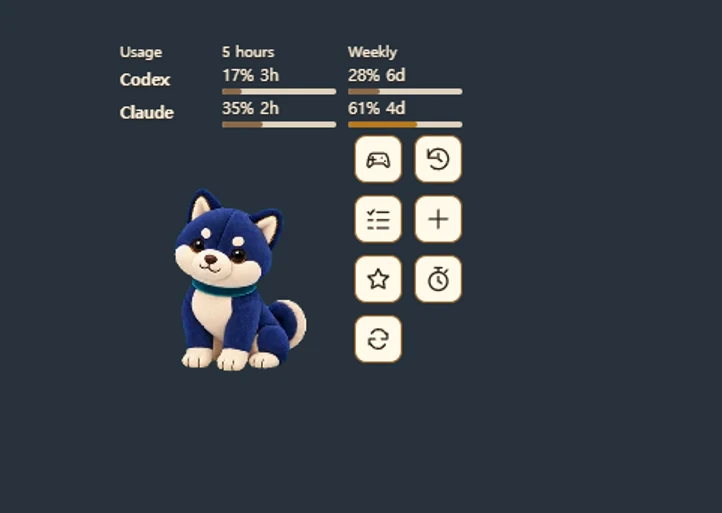
Download the free editionAvailable in both the free and paid editions. Keep an eye on your Codex and Claude subscription usage while you work. DotDog shows reported 5-hour and weekly usage, plus time until reset, beside your desktop companion. Check your limits before starting the next task, or see when it is time for a break.
Requires a connected account with an existing AI subscription and internet access. Available limits vary by provider and account; unreported limits appear as a dash. An AI subscription is purchased separately.
All six are app features included with one paid license, not separate products. No physical items or separate merchandise files. The images use actual Windows captures with explanatory labels.
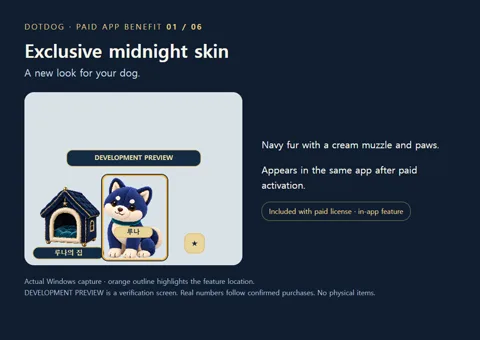
A navy dog with a cream muzzle and paws appears in the same app after paid activation.
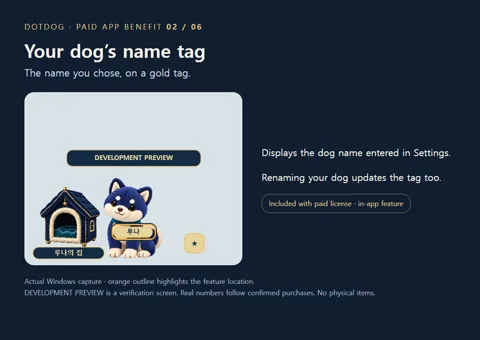
The gold tag displays the name entered in Settings and changes when you rename your dog.
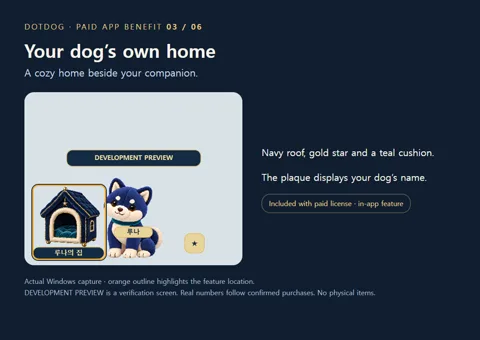
A navy house with a gold star and cushion appears beside the dog. Its plaque displays your dog’s name.
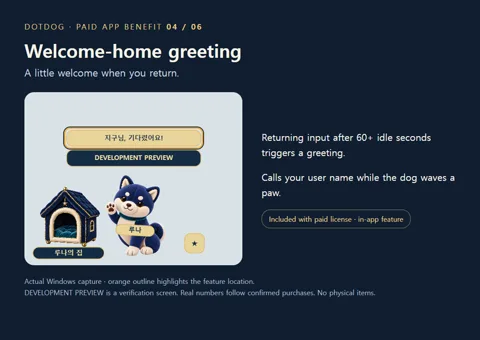
After at least 60 seconds without input, returning input triggers a personal greeting and a paw wave.
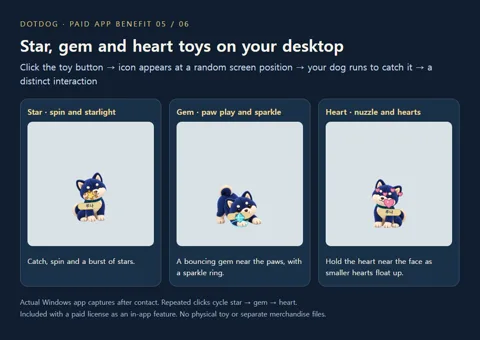
Click the toy button to place a star, gem or heart icon at a random screen position. Your dog runs to catch it. Repeated clicks cycle star → gem → heart. The star spins with starlight, the gem bounces near the paws with a sparkle ring, and the heart is held near the face as smaller hearts float up. Separate from free basic fetch.
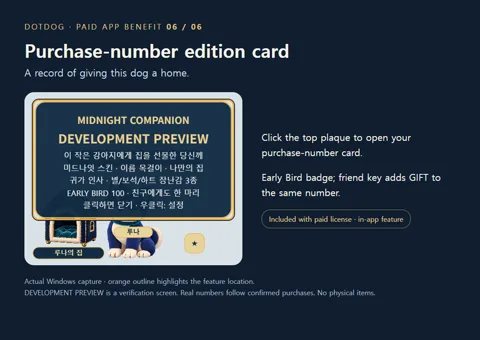
Click the plaque above the dog to open the card with your real purchase number. Early Bird shows EARLY BIRD 100; the gift key shows the same number plus GIFT.
These are digital features in the same app, included with both purchase routes. The edition card uses WADIZ for Wadiz purchases and COMPANION for store purchases; Early Bird and gift labels follow the purchased reward. Development previews are not issued purchase numbers.
Compare purchase routesFull features and all six Midnight elements are shared. Wadiz’s special offer is its limited-time pricing and the Early Bird gift key.
The unused gift key may be given to one friend. Canceling or refunding the order revokes both keys. No instant key delivery.
US$9.99
1 license key for one person
Korean store: KRW 9,900. International checkout has its own USD price; applicable tax is calculated at checkout. Check the purchase page for current sales availability.
A dog that breathes, blinks and wags its tail beside your work. Pet its head, play fetch and build a friendship, right on your desktop.
Actual Windows app recording · muted autoplay.
See what a full license addsPet your dog’s head, build friendship, play basic fetch and check AI subscription usage without purchasing DotDog or a time limit. Start with the free edition, then choose a full license when you want the added tools and Midnight elements.
The free edition includes pet reactions, petting, fetch, naming, friendship and AI subscription usage display. No time limit. Games, appearance customization and helper tools are included in the full edition.
Windows 1.1.7 / Mac 1.1.7 · Windows 1.1.7 release & checksums · Release notes & checksums. Choose your Mac type in Apple menu → About This Mac.
Windows: run the installer. Mac: open the DMG and move DotDog Free to Applications. The current installers are not Windows code-signed or Apple-notarized. On Mac, review the Open Anyway option in System Settings → Privacy & Security if launch is blocked. Keyboard reactions need Accessibility permission; petting and fetch work without it.
In DotDog Settings, change Language to English. The same installer supports Korean and English. A full license unlocks paid features in this app while keeping your dog's name and friendship.
Preview the free dog and the paid Midnight dog in motion. Activate a full license to use the paid dog in the app.
Some actions appear in response to fetch, your return or connected task notifications.
The full features and six Midnight elements are the same. Wadiz offers limited-time pricing, with an additional independent gift key in the Early Bird reward. Key delivery follows the successful funding and confirmed-payment schedule.
Yes. The full license and all six in-app benefits support Windows 10/11 x64 and macOS 12+ (Apple Silicon and Intel). Each key is for one person on up to three computers total across both platforms.
The campaign closes November 1, 2026 at 23:59 KST. Early Bird is KRW 7,900 for two keys (first 100 orders); Standard is KRW 8,900 for one key. Check Wadiz for current availability and remaining rewards.
No. Both the free and paid editions show usage percentages and time until reset for the 5-hour and weekly limits reported by connected accounts. This common feature is separate from paid AI task couriers and completion notifications. See the usage display details.
No. Your basic desktop dog and AI subscription usage display are free without a time limit. Games, appearance customization and helper features require a full license.
The basic pet works offline after downloading. AI subscription usage checks and AI tool integrations need internet access. A paid license needs internet for initial activation and paid-feature downloads; it works offline afterward and checks license status occasionally when online.
Use Deactivate this PC in Settings, then activate the same key on your new computer. You can use up to 3 computers. Contact support if your old computer is unavailable.
For Wadiz orders, contact support@lnrgame.com with your Wadiz order number. Existing direct customers can use Order lookup.
See our refund policy. Write to support@lnrgame.com with your order number. Mandatory consumer rights in your jurisdiction still apply.
Windows and Mac · limited-time Wadiz prices